
Data classes
Built Each Workspace has a classification. It decides which models may see its data, whether personal seats are allowed, and which knowledge and connections it may use.| Level | Means | Models |
|---|---|---|
| Public | may be published | allowed |
| Internal | for everyone in the company | allowed |
| Confidential | named teams only | allowed, if cleared for this level |
| Restricted | need-to-know; regulated data | allowed, if cleared for this level |
| Secret | no model may process it | none |
Custom levels are possible.
What a level controls
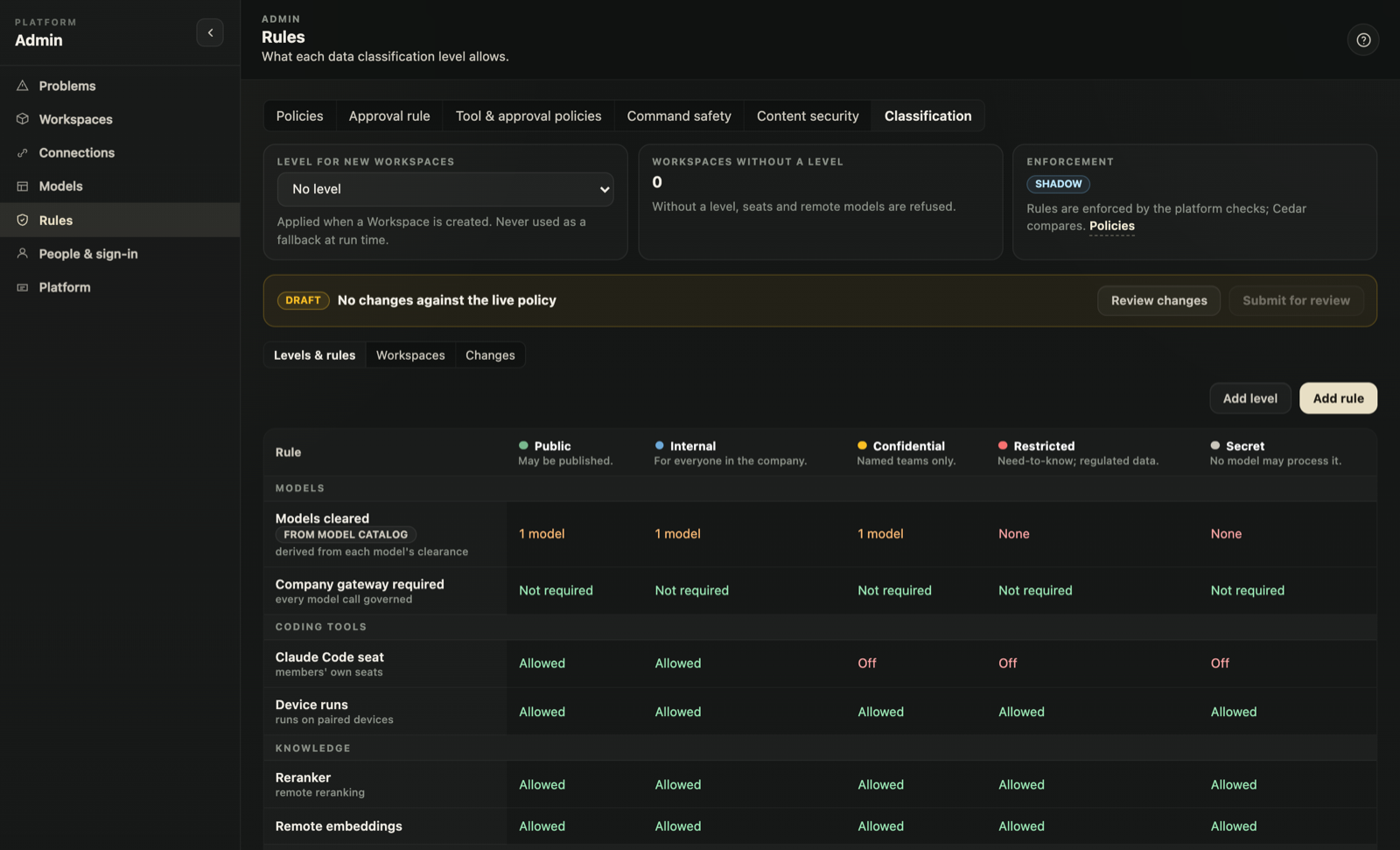
Admin › Rules › Classification shows a matrix of the levels against models, Claude Code seats, device runs, knowledge and connectors. Each model is cleared up to a level.
- Claude Code seat (members' own seats) is allowed by default below Confidential and off from Confidential up; a Workspace admin can still switch it off. A Workspace whose classification cannot be resolved counts as not allowed: Octryx AI fails closed, never silently open.
- MCP servers can be switched off for a level.
- Classification can run in shadow mode first: decisions are recorded but not enforced, so you see what would change.
Policies add rules on top of the classification; see Policies and four-eyes.