
Launcher and devices
In real runsoctryx-claude runs Claude Code on a developer's machine (Codex support is experimental) under the Workspace's rules: model policy, budget, secret scan and transcript. As a device, the same machine runs workflow phases for the platform. octryx is a short alias.You need
- Claude Code (
claude), signed in, and Python 3.11 or newer (oruv). The installer never installs Claude Code itself. - Either a Claude model on the platform (the governed route), or your own Claude subscription (a seat), if the Workspace allows seats. See Workspaces and roles.
Install
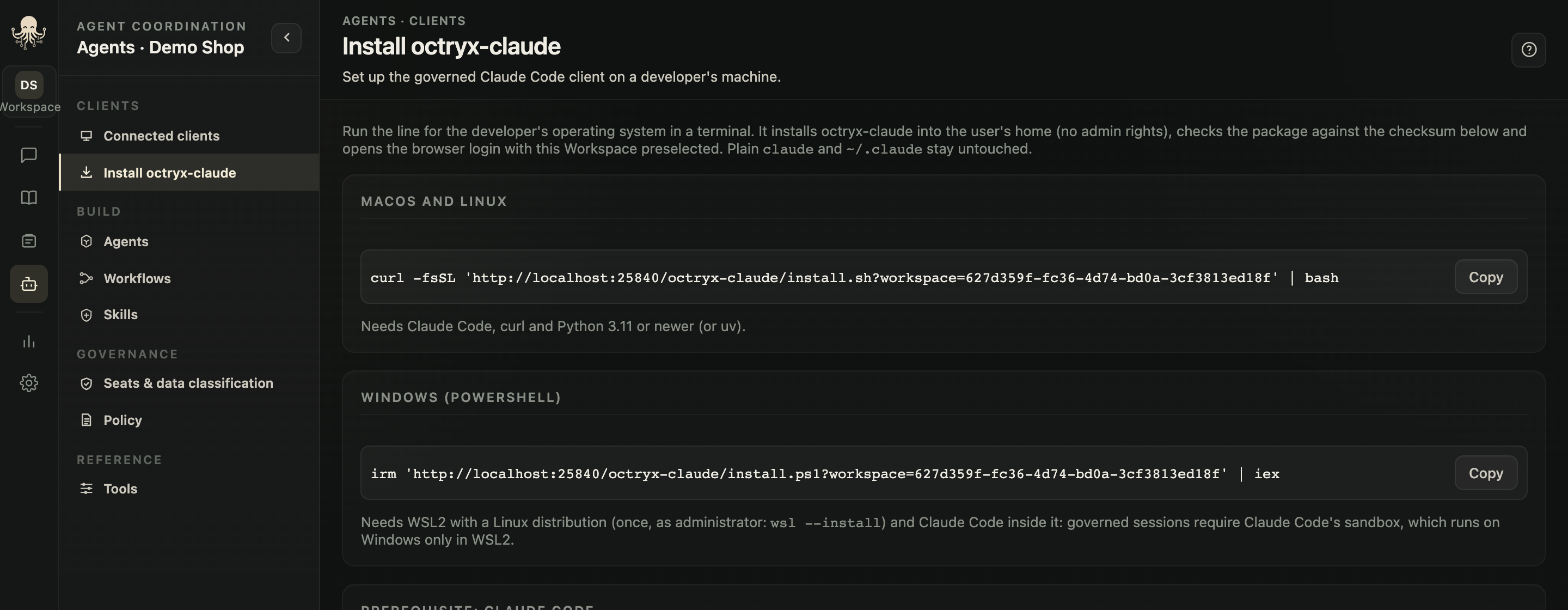
In Octryx AI, Agents › Install octryx-claude shows the install line for your Workspace:
curl -fsSL 'https://<your Octryx AI host>/octryx-claude/install.sh?workspace=<id>' | bashOn Windows (needs WSL2, no admin rights):
irm 'https://<your Octryx AI host>/octryx-claude/install.ps1?workspace=<id>' | iexThe installer checks the package's checksum and builds its own environment. Options after bash -s --: --no-login, --workspace <id>, --no-pet (macOS: no tray pet and no login item; --pet brings it back), --force. OCTRYX_CLAUDE_HOME=<folder> keeps a second installation apart.
Update and uninstall:
curl -fsSL 'https://<your Octryx AI host>/octryx-claude/install.sh' | bash -s -- update
curl -fsSL 'https://<your Octryx AI host>/octryx-claude/install.sh' | bash -s -- uninstall [--purge]
Sign in and start
octryx-claude login            # opens the browser to sign in
octryx-claude login --seat     # once, for your own Claude subscription
octryx-claude status           # Workspace, profile (governed or seat), model
octryx-claude                  # start a session in the current folder
octryx-claude --profile auto|governed|seat chooses the route; auto takes the seat when the Workspace allows it and a seat login exists. --work-item KEY ties the session to a work item.
Flags that would get around the platform are refused, for example --settings, --mcp-config, --plugin-dir and the permission-skipping flags.
Make the machine a device
octryx-claude device enable --folder ~/code/shop     # repeat --folder for more
octryx-claude device status # connected, folders, tools| Command | What it does |
|---|---|
device enable [--name N] [--folder PATH]… [--parallel N] | register and start the device service; again on an enabled device it adds folders |
device status | device, platform, service, connection, parallel jobs, folders and tools |
device folders [list | add PATH | remove PATH] | the folder allow list; adding asks for a confirmation on the machine |
device parallel N | jobs at the same time, 1 to 8 (default 6) |
device pause / resume | pause refuses new jobs and stops running ones, also offline; resume takes jobs again |
device logs [-f] | the service log |
device tools [--ensure] | the bundled tools |
device disable | stop being a device; the login stays |
A device connects out to the platform; nothing connects in. A job runs only in a folder inside the allow list; anything else is refused. A run works in a clone of the repository, so the folder is that clone. On macOS, Desktop, Documents and Downloads get a warning, because the service may not be allowed to read them.
Tools it brings
Built Nothing is installed system-wide. The launcher keeps pinned tools in its own folder:| Tool | Version | For |
|---|---|---|
| ast-grep | 0.51.0 | code search by structure |
| Playwright | 1.64.1 | the browser test |
| Chromium | Playwright 1.64.1 | only when a repository asks for it; the default is your installed Chrome |
| gitleaks | 8.30.1 | the secret scan; downloaded with a checked checksum |
Updates
On every start, the launcher asks the platform for its version (the answer is kept for 60 seconds). A new version is downloaded, checked, installed next to the old one and switched to at once; a version that fails to come up healthy three times is rolled back. The device service checks every 5 minutes when idle and never interrupts a running job. OCTRYX_CLAUDE_AUTO_UPDATE=0 turns this off.
What leaves the machine
- model calls, always through the platform's gateway with the secret scan;
- tool checks before and after each tool call: the tool's input and a shortened result, so also the text of a file the agent writes;
- job events, test screenshots, and live progress (live progress carries no file contents);
- during a workflow run, the change after every turn, as a patch against the base; the platform pushes it to a side branch for the run's work in progress with the Workspace's connection, fast-forward only and never forced. The agent itself never pushes. The launcher may also try that push with your own Git sign-in, as a fallback;
- the run's change as a patch against the base commit;
- for code intelligence, committed files only, never uncommitted edits, and only if the Workspace allows it; files over 1 MiB are never sent;
- a redacted session digest at the end of a session, and full transcripts only when the Workspace switches them on, redacted on the machine.
Claude Code's model calls pass the platform's gateway on both routes, governed and seat, so the platform also sees tool inputs and results inside the model requests; it keeps them redacted and shortened. Planned The launcher's own tool checks will send less: a path, a hash and a redacted excerpt instead of the full file text. That does not change what passes through the gateway.
Your credentials stay in the launcher's own file, which Claude Code's sandbox may not read.