Workflows and phases
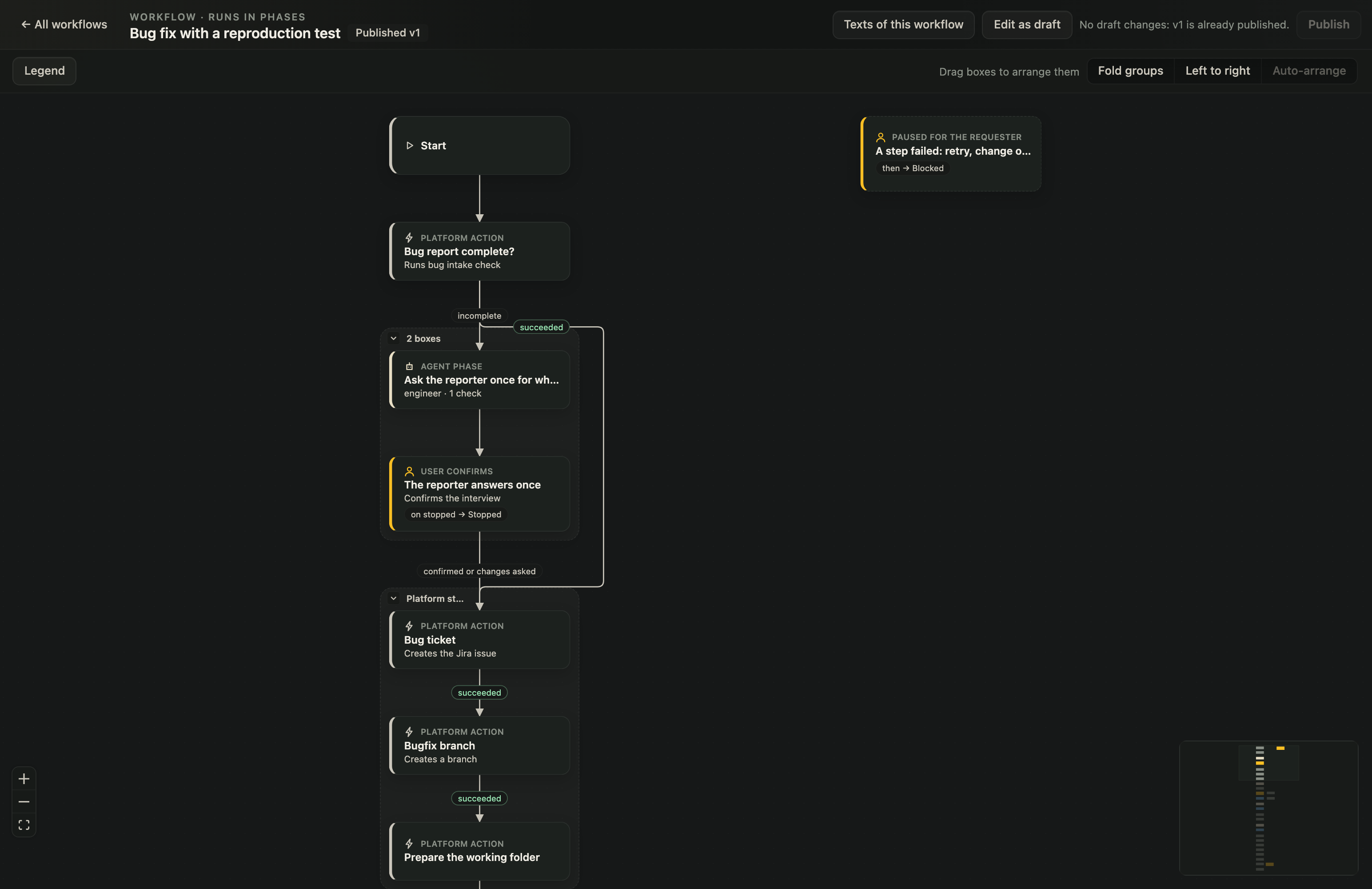
A workflow decides how a piece of work gets done: its phases, the checks in each phase, the loops when a check fails, and who has to approve what. Your coding agent works inside that frame. Workflows are drawn and published in the visual workflow designer; publishing validates them and is audited.
The workflows that come with Octryx AI
On a fresh installation these are on:
| Workflow | For | Starts from | Status |
|---|---|---|---|
| Bug fix with a reproduction test | a bug: reproduce with a failing test, fix, prove | a work item | In real runs |
| Story / epic delivery | a story, or the stories of an epic: implement, test, review, pull request, with documentation | a work item | In real runs |
| Spec writing | interview, spec draft, review in Spec Studio, split into stories | a work item | Built |
| PR review bot | the review bot's review of a pull request | a pull request | Built |
| PR explain | the bot's answer to @octryx explain | a pull request | Built |
These come with Octryx AI but are off on a fresh installation. A platform admin switches them on in Agents › Workflows, column On:
| Workflow | For | Starts from | Status |
|---|---|---|---|
| PR fix | the bot's fix run after @octryx fix | a pull request | Built |
| Jira intake & triage | is a ticket ready? If not, ask in the ticket | a work item | Built |
| Incident / alert analysis | collect evidence, a hypothesis that cites it, then a bug fix | a work item | Built |
| Team delivery | a coordinator plans, several agents work in parallel | a work item | Built |
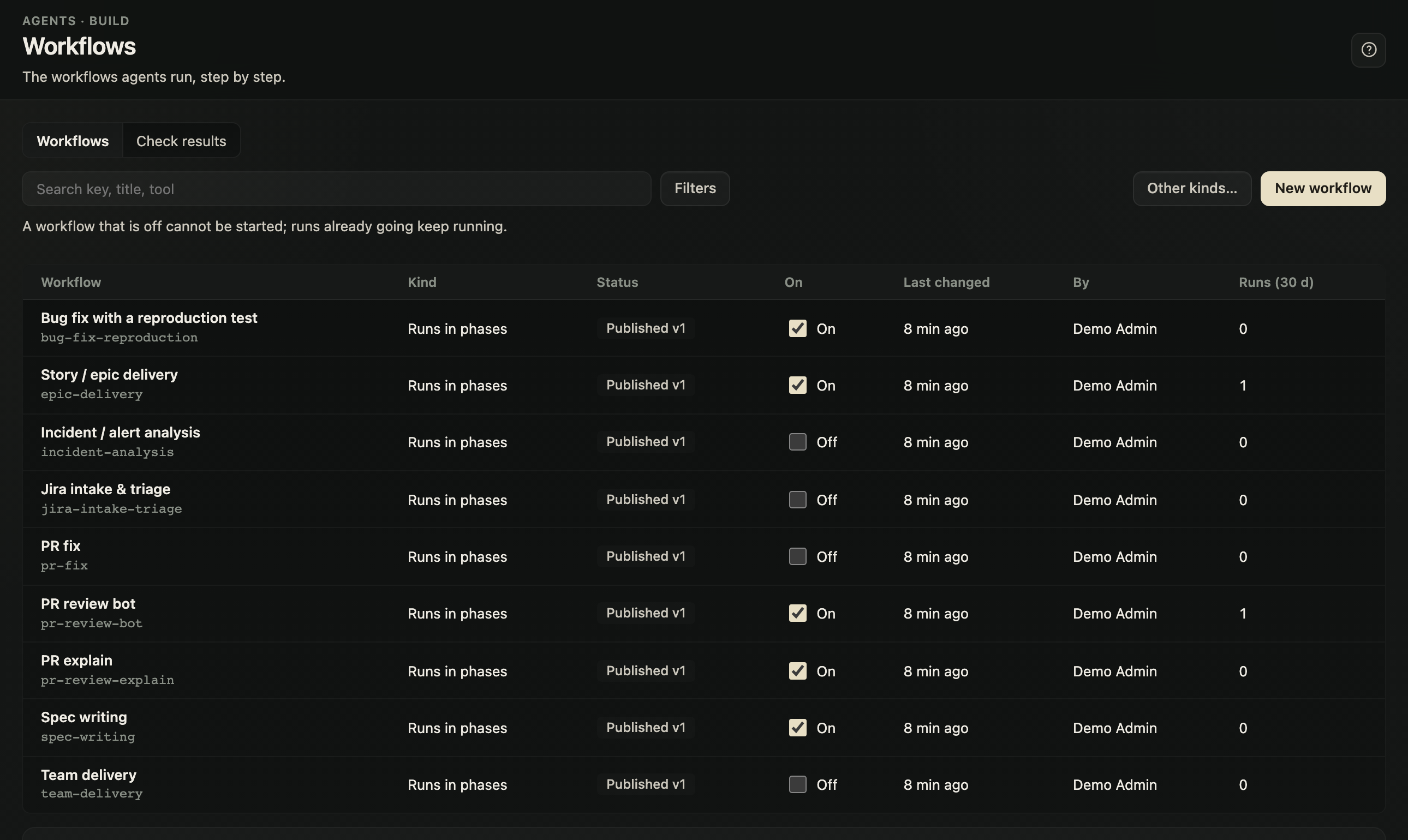
Only a platform admin can switch a workflow, not a Workspace admin. Switching one off stops new starts only; runs already going keep running. The choice is kept across upgrades: "off" above only describes a fresh installation. Archived workflows are not listed.
What starts a workflow
Each workflow's definition says what starts it: a work item (the default) or a pull request. The three PR workflows start only from a pull request, through the webhook, the sync or an @octryx comment. So they never appear in a work item's Start workflow dialog, and the chat does not offer them either.
On a fresh installation, a work item's Start workflow dialog offers Bug fix with a reproduction test, Spec writing and Story / epic delivery. Nothing is preselected and the person chooses. Where Jira intake & triage is on, it is preselected; where Incident / alert analysis is on, it is preselected for an incident.
Workflows no longer shipped
Story delivery, Ticket delivery, Review and comment and Feature delivery (tests first) no longer come with Octryx AI. An existing installation keeps them, and their old runs stay readable. They are still listed under Agents › Workflows, but nothing offers them for a start any more: not the Start workflow dialog, routing, the app, the chat or an epic's chain. A spec that had chosen one of them builds its stories with Story / epic delivery.
A bug, phase by phase
- Intake check: is the report complete? If not, ask first.
- Ticket and branch.
- Prepare the working folder on the developer's machine.
- Reproduce: the agent writes a test that fails because of the bug.
- Proof "red on the old code": the platform runs that test on the base commit; it must fail there (in size class S this is part of the pipeline). See Evidence and checks.
- Fix: the smallest change that makes the test pass.
- Green: the tests pass, lint passes, and the confirmed tests are unchanged apart from layout: a pure reformatting (same tokens, for example a call split over lines, other quotes, a trailing comma) still counts as intact, also on the developer's machine.
- Pipeline: the repository's declared tests, run without the agent.
- Browser test where the app has a UI.
- Independent review, including the root cause.
- Push and pull request, then report back to the ticket and watch CI and the merge.
When a check fails, the workflow loops back with a limit: a red pipeline goes back to the fix at most three times, a failed review at most twice. A bug that cannot be reproduced ends as "cannot reproduce", and the reporter is told.
Size classes
Not every item needs the full flow. A workflow can sort items into S, M and L when a run starts, from the ticket's type, labels, components, text and number of acceptance criteria. The first rule that matches wins. The risk comes from labels and components, never from words in the description. For example in the bug workflow:
- L for the label
full-flow, or labels and components such as security, auth, migration, database, payments or infrastructure; - M when an item has no labels and no components;
- S for an ordinary bug.
A smaller class runs fewer steps: in S and M the agent runs only the affected tests while the pipeline still runs everything; in S reproduction and fix happen in one turn, and the browser test runs only when the change touches the UI or the item is labelled ui-visible or hands-on. A class can only skip steps the platform marks as skippable, never a push, a pull request or a report. When a class runs out of rounds, the run moves up to the next class. Every skipped or kept step is recorded with its reason.
The rules live in the workflow's definition, so a team can change them without changing code.
Phase brief
Before its first call in a phase, the agent gets a short brief: "Phase '…', in short (the platform enforces exactly this)". It names the test, lint and system-test commands (for Python, Node and Flutter also how to see one red test's message), which files may change, whether tests are locked, and what the platform does itself, for example "commits, pushes and opens the pull request; never push yourself". Learned facts from earlier runs follow under "information, not a rule". In bug and epic runs the agent does not start the system test itself: the pipeline runs it on every pass. See Runs and their record.