
Connections
A connection links Octryx AI to one of your tools: Jira, Confluence, a Git host, a monitoring system. It is set up once, with its sign-in, and then used by Workspaces for knowledge, tickets, repositories and agent tools.
| Connection | Used for | Status |
|---|---|---|
| Jira | tickets, knowledge, agent tools | In real runs |
| Confluence | knowledge, agent tools | In real runs |
| Bitbucket | repositories, knowledge, review bot | In real runs runs on Server and Data Center · Built review bot, Cloud |
| GitHub | repositories, review bot | In real runs runs · Built review bot |
| GitLab | repositories, review bot | Built runs · In real runs review bot |
| MCP servers | agent tools; Octryx AI as an MCP server | Built |
| Grafana, Prometheus, Loki | live reads for agents | Built |
| Others | ServiceNow, Kubernetes, clouds, CI, channels | see the page |
Who sets them up
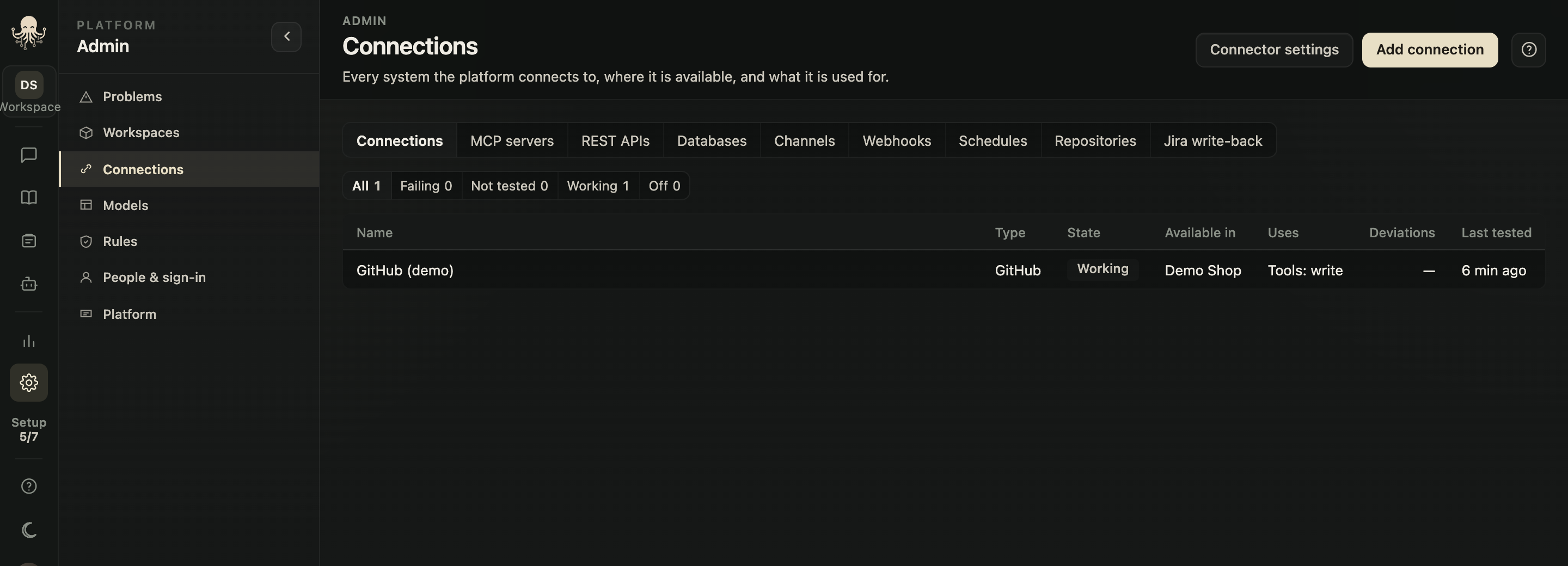
- Platform admins see and edit every connection, and can make one available everywhere.
- Workspace admins and owners can create connections for their own Workspaces only. Connections the platform manages are read-only for them.
- Anyone else cannot see the settings of a connection.
Add a connection
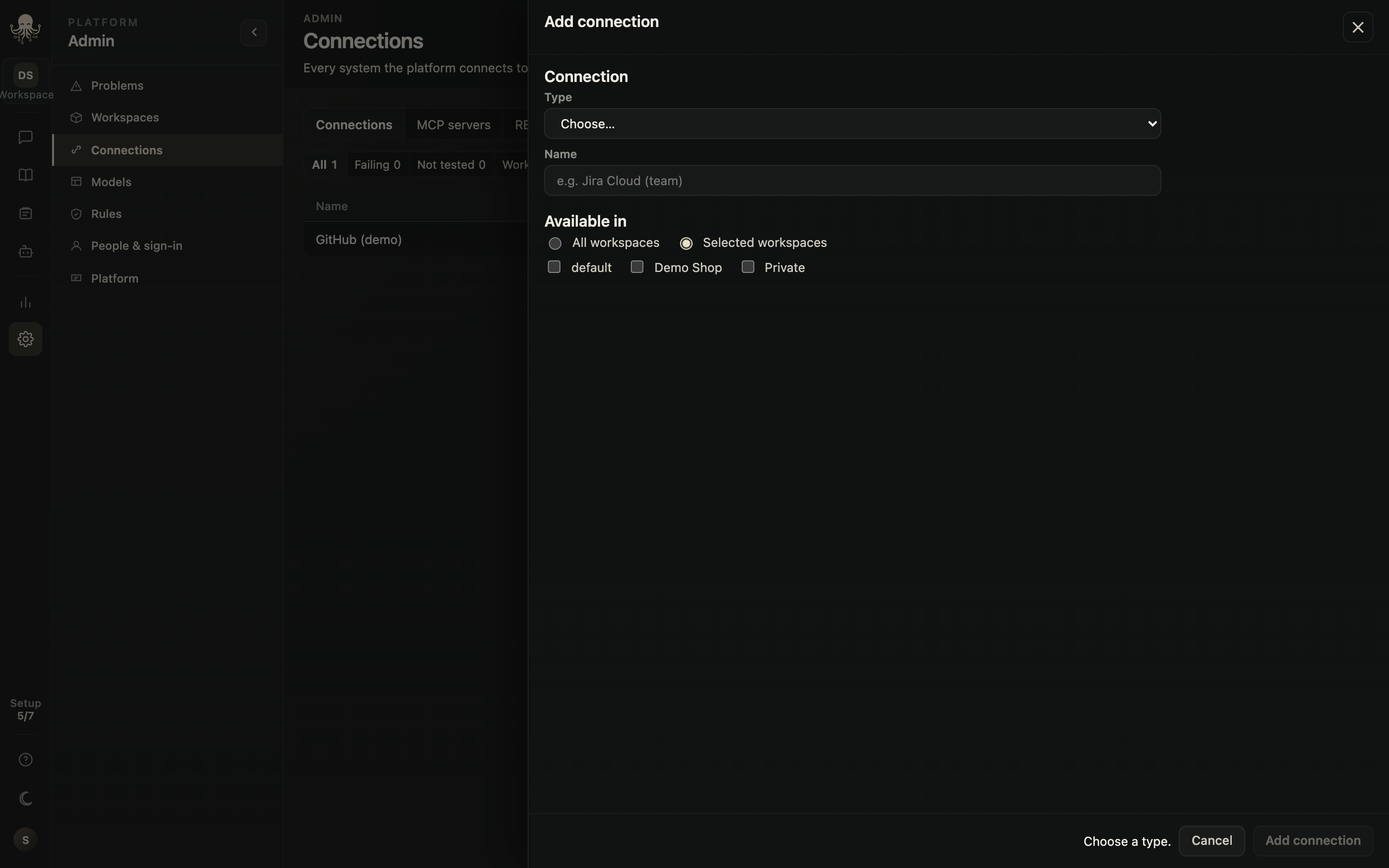
Open Admin › Connections and choose Add connection:
- Connection: the Type and a Name, for example "Jira Cloud (team)". The name is unique per type.
- Access: the address and the sign-in. The fields depend on the type; see each type's page.
- Available in: the Workspaces that may use it. The default is selected Workspaces.
Then Test, where the type offers it, checks the sign-in and the access to the bound projects, spaces or repositories. The connection shows Working, Failing, Not tested or Off.
What a connection is used for
Open a connection to see its tabs: Overview, Knowledge, Tickets, Agent tools, Repositories (Git hosts), Deviations and Errors.
- Knowledge: which projects, spaces or repositories are synced, and how often: manual, every 15 minutes, hourly, every 4 hours, daily at 06:00, or a custom schedule (at most every 15 minutes). See Build your knowledge.
- Tickets: which tickets start work (for Jira a JQL filter such as
project = KAN AND statusCategory != Done), how often they are read, and how their statuses map to Octryx AI's. - Agent tools: what agents may do through it, Off, Read or Read and write. The default is Read. The tab lists each tool as reading or writing.
- Deviations: a Workspace can narrow a connection for itself, never widen it.
Bound keys
A connection is bound to the projects, spaces or repositories it may touch: Jira project keys, Confluence space keys, owner/repo or a group. A call outside them is refused. At most 100 keys per connection.
Writes need a person
- From the chat: before the first write, a card Confirm the write plan lists every write, its tool, connection and fields. Once approved, those writes run; anything outside the plan asks again. Outbound messages are confirmed one by one.
- In a workflow run: writes are the workflow's defined steps, such as opening a pull request or commenting on the ticket, with the approvals the workflow sets.
- Every write is recorded in the audit log.
Credentials
- Secrets are stored encrypted with the instance's key and are write-only: the API never returns them. Leaving a secret field empty on save keeps the stored one.
- A secret belongs to exactly one connection and is never borrowed by another.
- When you change a connection's address, Octryx AI asks you to enter the secret again, so a secret never silently goes to a new host.
- Credentials never reach a developer's machine. During a run, pushing, opening pull requests and updating tickets happen on the server; on the machine
git push,gh,glab,jiraand calls to those hosts are refused.
Private addresses
Connections reach public addresses. A Jira, Confluence or Git host on a private address needs an entry under the connection type's private hosts (exact host and port), set by a platform admin.