
Policies and four-eyes
BuiltCedar policies decide what people and agents may do. By default, every policy change gets a second pair of eyes before it goes live.
Octryx AI stores its rules as Cedar policies. A guided builder and templates write the Cedar for you, so you don't have to. Open Admin › Rules › Policies.
What a policy can decide
Each policy answers a question of the form "May principal do action on resource in Workspace?". The actions are grouped in the builder:
- Connectors & tools: Use a non-connector tool, Read through a connector, Change data through a connector
- Models: Call a model (on the seat route or the governed route)
- Tool results: Receive a tool result before a model sees it
- Coding agent: Run a shell command, Read a file, Write or edit a file
- Knowledge: Use remote embeddings, Use a remote reranker
- Seats: Use a personal seat
- Devices: Run a chat request on an own device
The platform generates a baseline from your other settings, such as Classification and each Workspace's model policy. Your own policies add forbid rules on top of it. When no policy permits a request, Cedar's default is deny.
The Policies page
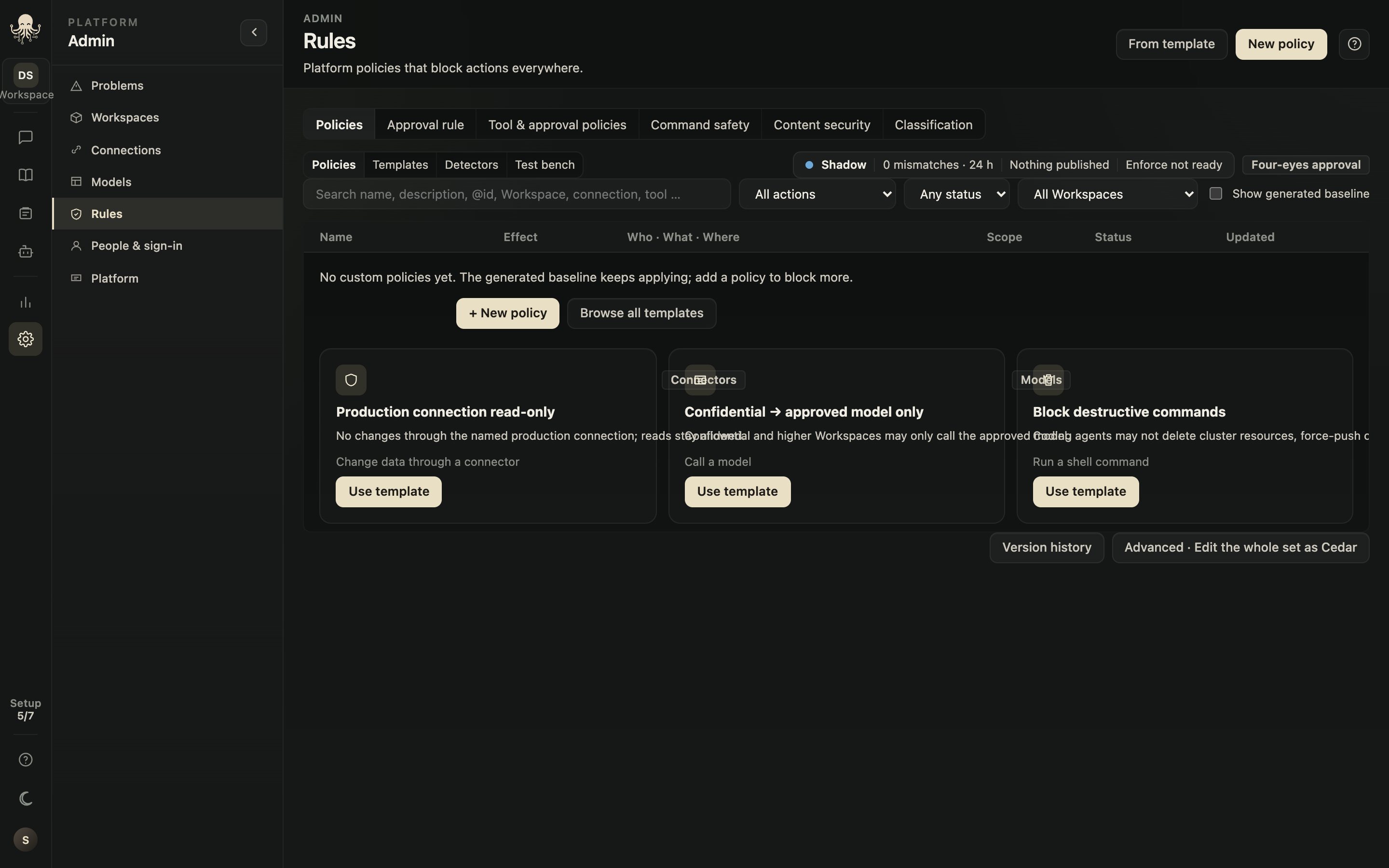
The page has four tabs: Policies, Templates, Detectors and Test bench. Next to the tabs, the policy engine card shows the current mode. Click it to open Status & mode, where you choose Off, Shadow or Enforce. A badge beside it shows the current approval rule.
The policy list shows generated and custom policies with their status (Generated, Published, or a draft state such as Draft · new or In review · changed) and their effect (Allows, Blocks, Masks, Routes or Masks · routes). From each policy's menu you can Edit (Edit Cedar for hand-written policies), Duplicate, Test, Show in Decisions or Remove it.
The policy builder
+ New policy opens the builder. It walks you through these steps:
- Basics: name and description. The
@idfollows the name. - Who: everyone, or members of roles, groups or named users.
- What: the actions to block, and optionally which connector, tool, model, command or path.
- Content: what the content scan must find. Shown only for model calls and tool results.
- Where: all Workspaces, chosen ones, a classification, or named connections.
- Outcome: block, mask, or route to an approved model. Shown only for content policies.
- Exceptions: when the block doesn't apply.
- Check & save: see what it would block, then Save to draft.
While you edit, the server generates and checks the Cedar. Advanced · Cedar (generated, read-only) shows the result.
Templates
Templates gives you ready-made starting points, for example:
- Production connection read-only
- Block destructive commands
- Block secret files
- No remote embeddings for confidential
- Secrets never leave
- PII masked for unapproved models
Pick one with Use template. The builder opens pre-filled, and you fill in only the highlighted inputs.
Detectors
Detectors find sensitive content. Policies decide what happens with it. The built-in ones cover common personal and financial identifiers, email addresses, phone numbers and credentials. With + Custom detector you add your own, for example a pattern for internal customer IDs. Custom detectors are saved into the policy draft like any other change.
Writing Cedar by hand
Use Edit as Cedar… to turn a builder policy into hand-written Cedar. It shows as Hand-written from then on. Advanced · Edit the whole set as Cedar opens the complete custom set in one editor.
Two neutral examples:
@id("no-rm")
forbid (principal, action == Action::"run_command", resource)
when { resource.program == "rm" };@id("no-writes-on-legacy-crm")
forbid (principal, action == Action::"write_connector", resource)
when { context.connections.contains("legacy-crm") };Test bench
Test bench asks the policies a question about a real Workspace and user. Nothing is executed and nothing is recorded. Save a question as a test case. Saved test cases run on every draft save and again at publish. A failing case blocks publishing.
Draft, review, publish
All changes collect in one draft of the policy set:
- Save to draft while you work. The saved test cases run each time.
- Submit for review. The text is now frozen (Draft in review (frozen)). You can still Withdraw it.
- Another platform admin opens Review & publish to see the changes, the Cedar diff and the test results, then approves.
- Publish makes the version live.
Version history lists every version with author and reviewer. Roll back creates a new draft from an older version, and that draft goes through review like any other.
Four-eyes approval rule
Admin › Rules › Approval rule sets the rule for every governed change: policies, skills, prompts, work strategies, evaluators, routing rules and the classification policy.
- Four-eyes (a second admin approves) is the default. The person who wrote or submitted a version can't approve it.
- Single admin may approve own changes is meant for installations with only one admin. You approve and publish your own change in one step. Each self-approval is recorded in the audit log.
Only platform admins can change the approval rule.
Tool & approval policies
Admin › Rules › Tool & approval policies sets which tools always ask a person and which never do (because they run their own approval). There is a platform default, and each Workspace can Inherit platform default or Add to the default.
Command safety
Admin › Rules › Command safety checks every shell command an agent wants to run. It has Checks you switch on or off, an AI risk review with a Security review model, Ask a person from score and Block from score, and lists such as Always blocked and Risky shell operators. If the review model isn't available, the command waits for a person. Agent guard rules and Workspace overrides live on the same page.
Content security
Admin › Rules › Content security shows, for each kind of data and each place it can appear, what the published policies do with it: refuse, mask or reroute, or only report. It also lists the Approved models a request can be routed to, and helps you migrate older Message filters into detectors in the policy set. The per-Workspace choice of action for each content kind is described in Sensitive content handling.
Limits today
- Custom policies can only restrict (block, mask or route). They can't grant more than the baseline allows.
- The engine starts in Shadow. Policies take effect as denials only in Enforce.